.png)
How to Find What Something Is Worth From a Photo (Best Apps for Resellers)
The resale market keeps getting faster, and so does pricing research. Today, sellers can point a phone camera at a pair of trainers, a vintage lamp, a branded jacket, or a kitchen appliance and get instant clues about what it is and what buyers may pay for it. Tools like Google Lens, Amazon Lens, eBay image search, ChatGPT, and newer resale-focused apps now help sellers move from “What is this?” to “What should I list it for?” in minutes, not hours. Visual search is now a mainstream shopping behavior, and platforms including Google, Amazon, and eBay all support image-led discovery in some form.
For resellers, that matters because speed is everything. A quick photo can help identify an item, surface similar products, show current competition, and give you a starting point for resale pricing. But there is one important catch: no app can see the full story from a single image. Condition, authenticity, rarity, platform fees, and sold history still matter. The smartest sellers use photo tools as the first step, then verify with real market comps before listing.
This guide breaks down the best apps to take a picture and see how much something might be worth in 2026, how each one helps, where each one falls short, and how to turn those insights into faster listings across multiple marketplaces with Zipsale.
You Will Learn
- How to compare photo-based results across eBay, Google, Amazon, and AI tools
- A practical workflow for turning a photo into a well-priced listing
- Common mistakes resellers make when trusting AI pricing too quickly
- How Zipsale helps you move from pricing research to live crosslisted inventory faster
How Photo-to-Value Apps Actually Work
Most “what is this worth?” apps do two jobs at once. First, they try to identify the item using image recognition, text recognition, logos, labels, patterns, packaging, or shape. Then they connect that identification to some kind of pricing context, whether that is current shopping listings, marketplace references, resale databases, or internal valuation models. Google Lens, Amazon Lens, and eBay’s image search all focus heavily on visual matching, while newer tools like Worthwise, Revalue and ThriftAI position themselves more directly around value estimation.
That does not mean they all return the same kind of value. Some tools are best for identifying an unknown object. Some show retail pricing rather than resale pricing. Some estimate a range based on marketplace signals. Others are better for clothing, thrift finds, or general second-hand goods. That is why experienced sellers rarely rely on just one app. They use one tool to identify the item, another to check comps, and then their own judgment to set the final price.
.png)
Are There Really Apps That Tell You What Something Is Worth?
Yes, but “tell you what it is worth” is a bit misleading. These apps can help you estimate value, but they usually cannot give you an exact selling price with full confidence. A photo alone cannot always reveal hidden flaws, missing parts, repairs, sizing details, or authenticity issues. Even the best result should be treated as a starting point, not the final answer.
For mass-produced items with clear branding and lots of sales history, the estimates can be very useful. For rare collectibles, antiques, unbranded vintage goods, handmade items, and heavily worn products, manual research still matters much more. In other words, these tools are great for speed, but resale profit still comes from verification.
Best Apps to Take a Picture and Check What Something Might Be Worth
Below is a cleaner reseller-focused shortlist. Each app solves a slightly different part of the pricing problem.
.jpg)
The mainstream platforms all clearly support image-led search, while the newer resale-focused apps position themselves around valuation, profit checks, or market comparisons.
1. Google Lens
What it does: Google Lens helps you search with a photo or screenshot and is one of the fastest ways to identify an item when you do not know exactly what it is. It is especially useful for branded products, homewares, decor, books, shoes, toys, and random second-hand finds.
Why sellers use it: It is excellent for the first step of research. If you pick up an item at a charity shop or car boot sale and are not sure what model, line, or style it is, Google Lens can surface matching products and useful text clues very quickly. Google also continues to position Lens as a core visual search experience for consumers.
Where it falls short: It is an identification tool first, not a true resale pricing engine. It may show shopping references, but those are often current asking prices or retail results, not what second-hand buyers have actually paid.
Best use case: Start here when the item is unfamiliar.
2. eBay Image Search
What it does: eBay’s app supports image search, letting users upload a photo and find similar listings. For resellers, this is useful because it takes you straight into a live marketplace where resale intent already exists.
Why sellers use it: It is one of the fastest ways to move from “what is this?” to “what are similar sellers asking on eBay?” That makes it especially helpful for fashion, electronics, games, tools, collectibles, and home goods.
Important nuance: eBay image search is useful, but sellers still need to manually interpret the matches and check sold comps. Community discussions also suggest that the sold-items flow tied directly to image search has changed over time, so it is safer to treat image search as a discovery tool and then refine with normal eBay filters.
Best use case: Use it when eBay is one of your main marketplaces and you want fast comp hunting.
3. Amazon Lens
What it does: Amazon Lens lets users search with their camera inside the Amazon app. It is especially effective for modern retail items that already exist in Amazon’s product catalogue.
Why sellers use it: It is helpful for boxed appliances, beauty devices, home gadgets, kitchenware, toys, books, and electronics where exact model matching matters. If you are trying to identify a current retail product, Amazon can be very accurate.
Where it falls short: Amazon pricing is retail context, not second-hand resale value. A product selling new on Amazon for £60 does not automatically mean your used item is worth £45. Condition, fees, demand, and the right platform all matter.
Best use case: Use it to identify exact models and compare against new replacement cost.
.png)
4. ChatGPT
What it does: ChatGPT can analyze images that users upload and help identify items, interpret labels, compare possible categories, and suggest a pricing research path. OpenAI’s help documentation confirms support for image inputs in chat.
Why sellers use it: It is particularly useful for items that are harder to classify with standard visual shopping tools, like vintage decor, unusual fashion, mixed-lot finds, or objects where you need explanation rather than just a product match. You can ask follow-up questions, compare possibilities, and get help forming better search terms.
Where it falls short: It does not automatically replace live sold-marketplace research. You still need to verify prices manually using current comps on the marketplaces where you actually sell.
Best use case: Use it when you need reasoning, not just matching.
5. Worthwise
What it does: Worthwise markets itself as an AI-powered valuation tool that takes a photo of an item and returns a current value estimate based on web and marketplace signals. Its App Store description specifically mentions antiques, thrift finds, electronics, sneakers, and collectibles.
Why sellers use it: It is designed around valuation rather than pure search, which makes it attractive for quick thrift-store decisions. If you need a rapid “worth checking or not?” answer, this kind of app can be useful.
Where it falls short: Like most newer AI valuation apps, the estimate is only as good as the visual match and the market data behind it. Sellers should still verify the final number with recent comps.
Best use case: Quick decision support across mixed categories.
6. Revalue
What it does: Revalue positions itself as a pricing assistant for thrifted finds, with image-led identification and historical pricing data. Its website says it works across clothing, furniture, home goods, electronics, and more, while its app listing highlights clothing value scans and market comparisons.
Why sellers use it: It is especially relevant for sellers who work heavily in fashion and thrift categories, where branding, silhouette, fabric, and resale demand all affect price.
Where it falls short: It is still a guidance tool, not a guarantee. Clothing resale depends heavily on condition, seasonality, platform, and size demand.
Best use case: Fashion-focused resellers and casual thrift sourcing.
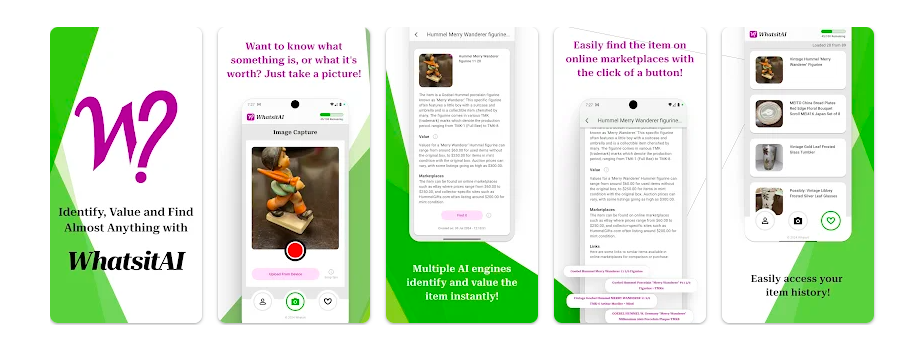
7. WhatsitAI
What it does: WhatsitAI positions itself as a tool to identify items and check resale value. Its Play Store and App Store listings describe it as a side-hustle helper for identifying objects and checking market value across resale platforms.
Why sellers use it: It is broad rather than niche, which can be useful when you sell across categories and want a simple mobile-first tool. It is the kind of app that can help at yard sales, flea markets, second-hand shops, and when sorting random inventory from home.
Where it falls short: Broad tools often work best on common items and can be less reliable for luxury, rare antiques, or highly specific collectibles.
Best use case: General second-hand sourcing.
8. ThriftAI
What it does: ThriftAI is built around resale value and profit potential. Its App Store and site descriptions focus on scanning second-hand items to estimate resale range, fees, market demand, and likely profit.
Why sellers use it: This makes it especially attractive for in-store sourcing, where the question is not only “what is this?” but “can I make money on it after fees and shipping?”
Where it falls short: Profit projections are still estimates. If the item is niche, seasonal, damaged, or hard to authenticate, the real outcome may differ.
Best use case: Flippers and thrift resellers who need fast buy-or-pass decisions.

A Better Reseller Workflow: From Photo to Final Price
The fastest way to use these apps is not to trust one app blindly. It is to use them in sequence.
1. Start with identification
Take a clear photo in bright light and use Google Lens, ChatGPT, or WhatsitAI to identify the item, brand, model, or style. The goal at this stage is not to set a price. It is to understand exactly what you are holding.
2. Check marketplace competition
Once you know what it is, use eBay image search or a manual marketplace search to compare similar listings. Look at listing titles, category fit, condition, and demand.
3. Verify with sold comps
This is the step many sellers rush. Asking prices are not the same as sale prices. Recent sold listings are usually a much better signal of what buyers are actually willing to pay.
4. Adjust for condition and platform
A boxed item, a like-new jacket, a complete collectible set, or an item with labels still attached can outperform the average comp. Missing parts, stains, cracks, scuffs, or heavy wear usually pull the price down. Platform fees and shipping should also shape your final number.
5. List it where it makes sense
Some items move best on eBay. Some do better on Vinted, Etsy, Depop, or Facebook Marketplace. Once your research is done, the next challenge is getting the listing live everywhere that matters without duplicating work. That is where crosslisting becomes the real time-saver.
How These Apps Fit Into a Zipsale Workflow
Photo-based value apps solve the research problem. Zipsale solves the execution problem.
Once you have used a photo tool to identify the item and checked resale comps, you still need to create the listing, write the title, upload the photos, choose the right marketplaces, and keep inventory synced. Doing that manually across multiple platforms is where sellers lose time and create risk. A seller can price an item well and still miss sales if it only goes live on one marketplace. That is also where double-selling becomes a problem if stock is not tracked properly.
Zipsale helps bridge that gap. Instead of repeating the same work across marketplaces, you can turn your pricing research into live listings faster and distribute inventory across more channels from one workflow. For sellers dealing with one-off second-hand items, that matters just as much as the pricing app itself. The value is not only in knowing what something may be worth. It is in getting it listed quickly, accurately, and in the right places before demand cools.
Tips to Get Better Results From Photo-Based Pricing Apps
Use plain backgrounds when possible
A cleaner photo makes it easier for visual recognition tools to isolate the item. This is especially helpful with clothing, shoes, decor, and small hard goods. Platforms like Google Lens are built around image-led recognition, so cleaner visual input usually helps.
Include labels, tags, and close-ups
A front photo is useful, but labels, care tags, serial numbers, soles, hardware, maker’s marks, and packaging often improve accuracy far more than a full-body shot alone.
Compare at least two tools
One app may identify the item correctly but give weak pricing context. Another may give a better resale estimate but misclassify the item. Comparing results helps you spot outliers.
Treat AI pricing as a range, not a final answer
The most reliable pricing still comes from real-world sold comps and marketplace knowledge. AI is there to reduce guesswork, not replace reseller judgment.
Be careful with rare items
For antiques, designer goods, signed pieces, specialist tools, or highly collectible products, photo tools can be helpful for clues, but not for certainty. Those categories often need deeper manual research or even authentication.
Common Mistakes Sellers Make
One of the biggest mistakes is pricing from the first number an app gives you. Another is comparing your item to the wrong version, size, colourway, generation, or condition. A third is relying on current listings only, instead of checking what actually sold. That last point matters because live listings reflect seller hope, while sold listings reflect buyer reality.
Another common problem is stopping after the research phase. Sellers may identify an item and even price it correctly, but then leave it sitting in drafts or only list it on one platform. The real advantage comes when pricing research turns into fast execution.
FAQ
Can I take a picture of something and find out what it is worth?
Yes, you can take a picture and use visual search or AI valuation tools to get an estimate. But the result should be treated as a starting point, especially for second-hand resale. The best final pricing comes from checking recent sold comps.
What is the best free app for identifying an item from a photo?
Google Lens is one of the best free options for fast visual identification, and eBay image search is especially useful when you want resale context on similar listings.
Is there an app that tells you the exact resale value?
Not exactly. Some apps estimate value ranges, but exact resale value still depends on condition, platform, timing, fees, authenticity, and demand.
Is Google Lens good for pricing?
Google Lens is very good for identifying products and finding visually similar results, but it is better as a discovery tool than a final pricing tool.
Is ChatGPT good for pricing second-hand items?
ChatGPT is useful for identifying unusual items, narrowing down possibilities, and helping shape your research, but you should still verify price with live marketplace comps.
What should I do after I check the price?
Once you know what the item is and what price range makes sense, the next step is to get it listed quickly on the right marketplaces. That is where using a crosslisting workflow can save time and widen your reach.
Final Thoughts
Apps that let you take a picture and check what something might be worth are genuinely useful in 2026. They speed up identification, reduce guesswork, and make it easier to assess second-hand inventory on the go. But they work best when used as part of a wider reseller system, not as a magic answer. The winning workflow is simple: identify the item, verify the comps, adjust for condition, and list fast across the marketplaces that matter.
What happens if you add just one more marketplace?